Sqlkit & Sqledit
Sqlkit is a tool to edit data of a database (as opposed to schemas) in the easiest possible way. By easy we mean both: easy to write for the user since completion helps you, and easy to write for the programmer as a lot of features are there to help you customize it. It’s based on PyGTK.
It provides:
- a GUI named sqledit that can be used standalone and does not require programming knowledge
- a Python package that mainly provides two megawidgets: SqlMask and SqlTable, very powerful classes to build your application.
A typical usage can be:
from sqlkit.widgets import SqlTable, SqlMask
from sqlkit import DbProxy

db = DbProxy(engine='sqledit:///movies.sqlite')
t = SqlMask('movie', dbproxy=db, single=True)
that will pop up an editor for the record. Filter panel will be available just clicking on the label of the fields.
Features
Main features of sqlkit:
- Editor of databases in 2 modes: SqlTable & SqlMask. Mask can embed tables of related tables.
- Based on sqlalchemy: can cope with many different database backends (PostgreSQL, MySQL, sqlite and firebird the ones sqlkit was tested on). Can be used to edit any selectable you can build with sqlalchemy.
- Very powerful filtering capabilities:
- each field can be used to filter visible records
- date filtering possible also on relative basis (good for saved queries)
- works on expressions too
- works on fields in related tables embedded in mask
- Completion both on normal fields and foreign key fields
- Very easy way to draw a layout for mask views
- Sqledit - the standalone program to browse and edit data: python script to edit db
- Completely effortless editing of Relationships
- Very easy way to set Defaults
- Possibility to display Totals in numeric fields
- Constraints: any possible sql constraint can be attached to a Mask or a Table. It can be expressed as a normal sqlalchemy query or with django-like syntax. Works on expressions too.
- SqlMask and SqlTable are widgets with several Signals
- Hooks for a very easy customization of behavior and for validation
- More than 70 snippets of code to demonstrate each feature
Table
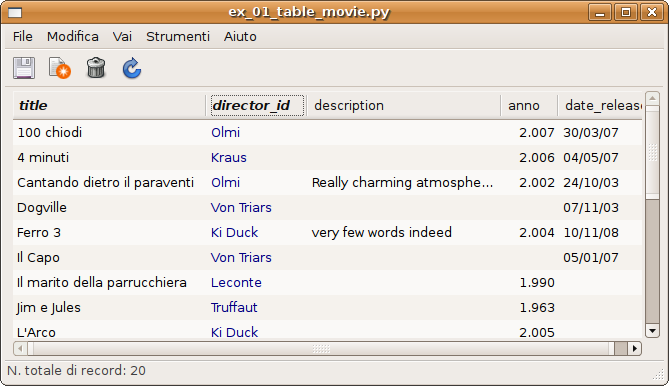
You can see data in a tabular format using the SqlTable widget.
The code is as simple as:
t = SqlTable('movie', dbproxy=db, )
you can customize which columns to show, possible filters or constraints (see below), and a lot of others details
Mask
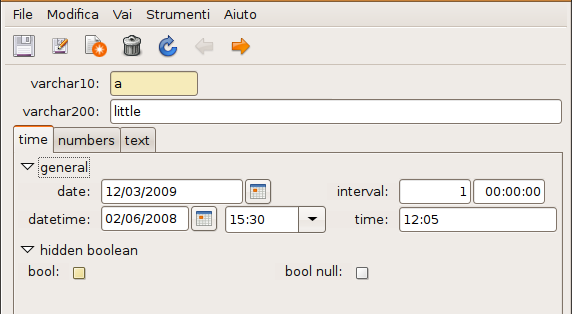
Records can be displayed one record at a time with the SqlMask widget. Tables can be embedded in mask to edit Relationships.
that where requested by the following instructions:
lay = """
   varchar10
   varchar200  - - -
   {N  { %time
         {>>.general

            date        interval
            datetime    time
            }
         {>.hidden_boolean
            bool    bool_null
         }
        }
      {  %numbers
         integer
         float
         numeric
      }
      {  %text
         text
         uni_text
       }
       } - - -


"""
t1 = SqlMask('all_types', dbproxy=db, layout=layout, )
Filters
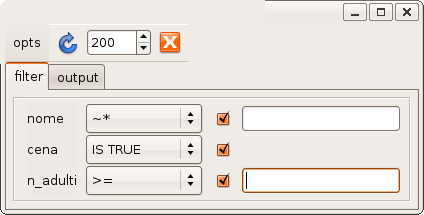
Each label of both views can be clicked to get a filter panel through which we can choose an operator and filter records. Filter let you use a “human” representation of foreign keys, that means that if director_id points to a numeric id, sqlkit will let you write the (last) name of the director instead when filtering.
The filter panel will let you navigate in the output list, that can be completely customized.
Completion
Completion is triggered by F1 key, Ctrl-Enter or Shift-Enter. If the field is a foreign key it will pop up a list of foreign values otherwise it will show values currently used (just for varchar fields).
The search for completion is done using the (possibly) already written letters as filter: Control will match them at the beginning of the field, Shift (and F1) will match them in any part. The search is made using LIKE operators or regexp according to whatever is available in the db engine in use.
Layout
Very easy way to draw a layout. See A GUI description language - purpose widgets for a tour. The language used relates to glade as a markup language relates to html.
This GUI description language lets you draw a layout using field_name as place holders for the widget that you will use to edit it:
title
director_id
will be replaced by a label ‘title’ followed by an entry and a title ‘director_id’ followed by a widget suitable to edit a foreign key.
Le language gets more complicated to let you use main gtk widgets as frames, notebooks, scrollable widgets, tables....
Relationships
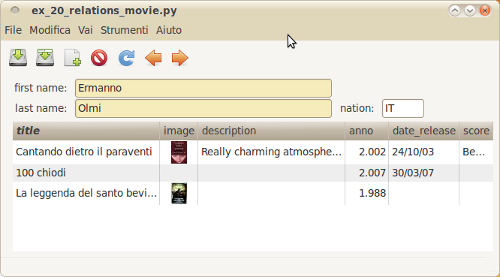
This is probably the most impressive feature.
You can build a layout in which related data are displayed in a totally natural way. The following layout requires the code:
lay = """
   first_name
   last_name
   nation
   o2m=movies:title,description,year,date_release
"""
SqlMask(Movie, layout=lay, dbproxy=db)
now you can edit director and films. The demo has plenty of working examples for there cases:
| many2one: | are just recognized automatically with simple introspection |
|---|---|
| many2many: | is very simply added to SqlMask declaring in the layout and attribute with that name |
| one2many: | same as many2many |
Many more detail in Relationships
Totals
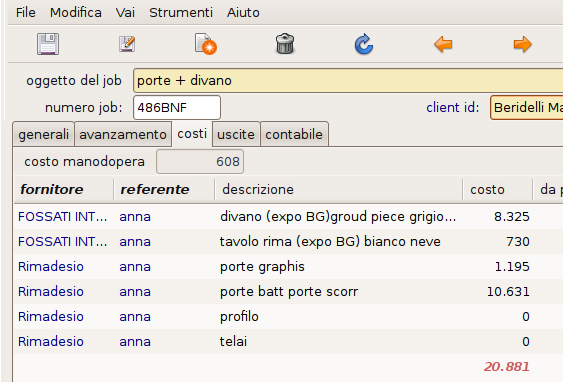
It’s possible to display totals and subtotals in a table view. In this picture you can see how a table embedded into a mask can display totals.
More in Totals
Constraints
A constraint can be as simple as:
t = SqlTable('movie', dbproxy=db)
t.add_constraints(actors__country='ITA', genres__name='drama',
  year__gte=1950, year__lte=1970)
And browsing of movies will be constrained into dramas with at least one italian actor, produced between 1950 and 1970. The double underscore ‘__’ will allow spanning from one table to a related (provided a relation was established at sqlalchemy level) and from attribute name to operator to e used.
Sqledit
A full featured program (python script) that can browse a database. Many options (sqledit -h).
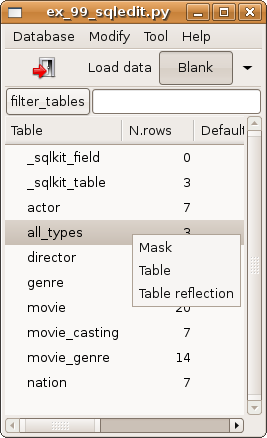
Just try it out on your preferred database using the url in a form as one of the examples:
sqledit postgres://localhost/mydb
sqledit postgres://sandro:passwd@host:5444/mydb
sqledit mysql://localhost/mydb
sqledit sqlite:///movies.sqlite
the last is a very minimal db present in doc/db/movies.sqlite
Basic assumptions and limitations
You use PrimaryKeys and ForeignKeys throughout the db. If you don’t use ForeignKeys sqlkit will just work w/o any special behavior. If you don’t use PrimaryKeys sqlkit will not even open the table.
ForeignKeys are simple. Compound ForeignKeys are not yet supported, that means that you can’t use:
class MyTable(Base):
   ...
   ForeignKeyConstraint('first_field, second_field], [referenced1, referenced2])
This will be addressed in a future release
You are using one single metadata. This is a limit but it’s my normal environment. There’s not really anything that cannot be changed easily about this, simply I didn’t have need for this, nor working cases. (While I was plenty of ideas on other features...)
ForeignKeys
Everywhere there’s a ForeignKey I try to represent it in the best possible way. More info in the completion chapter: foreign key description & search field
sqlkit supported backends
Sqlkit is built on sqlalchemy that allows editing db with many different engines. I use it with PostgreSQL, MySQL, sqlite and Firebird. Other engines are supported but may need a very simple addition that I’d be willing to do on demand.